Free Browser Games for Kids and Families
Published · 5 min read
Browser games are an easy way for a family to play together. There is nothing to install, nothing to buy, and the same game works on a phone, a tablet or the family computer. But "free" and "for kids" can mean very different things from site to site.
This guide covers what parents can check before a child plays a browser game, and some ZUQ Play games that families can enjoy together. These are our own suggestions, not certified age ratings, so please try each game yourself and decide what suits your child.
What to check before your child plays
Does the game connect to strangers?
Some games are played alone or against computer opponents. Others put you in online matches with people you do not know. For younger children, solo games and games played together on one device are the simplest choice. If you allow online play, use private rooms with a code that only your family or known friends have.
Does it ask for an account or personal details?
A good browser game for kids should be playable without signing up. Teach children never to use their real name, phone number or school in a player name.
Is there any real money involved?
Avoid anything with betting, cash prizes or paid entry. ZUQ Play has no betting, gambling or real-money games. Every game is played for fun.
Is it calm or intense?
Fast reaction games can be exciting for older children and frustrating for younger ones. Puzzles with no timer let a child think at their own pace.
How long is a round?
Short rounds make it easier to stop. A game that ends naturally after a few minutes is easier to finish than an endless one.
Free online games for kids: calm puzzles for every age
These two games are solo puzzles with no online opponents. They are the ones in the ZUQ Play family collection.
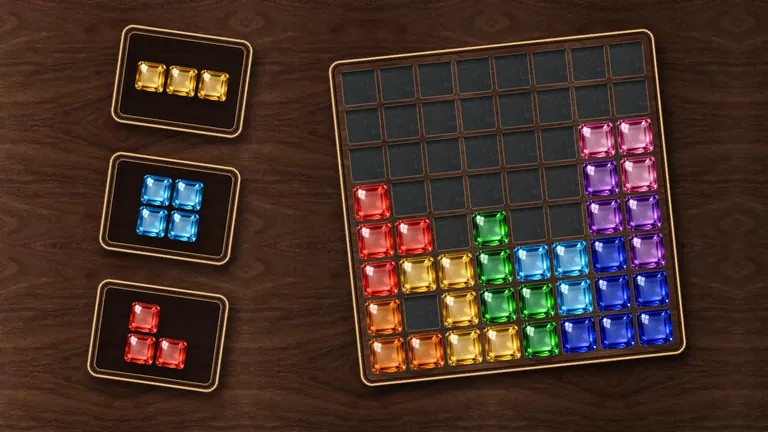
Block Pop
A calm block puzzle. Drag pieces onto an 8 by 8 board and fill whole rows or columns to pop them. There is no timer in the classic mode, so younger players can take as long as they like over each piece, and grown-ups can sit beside them and talk through where each block should go. It works with touch, a mouse or a keyboard, and sound and vibration can be switched off.
Mango Merge
Drop fruits into a crate and watch two matching fruits merge into a bigger one, all the way up to the King Mango. Young children enjoy the fruit and the bouncing; older children start planning chains of merges. A guided first merge teaches the idea, and there are reduced-motion and low-effects settings. The 20-Fruit Challenge is a short round of exactly 20 drops, which makes a natural stopping point.
Games to play together on one device
Playing side by side is often more fun than playing alone, and it keeps everything within the family.
Ludo Party
Classic Ludo, a board game many grandparents, parents and children already know. Two to four people can pass one phone or tablet around, or a child can play against friendly bots on Easy. It is a good way to practise counting, taking turns and losing gracefully. If you are unsure of the rules, read our guide to Ludo rules.
Gobble City
A bright 3D game where you are a hole in the ground swallowing people, cars and buildings. In City Duel two players share one keyboard, one using WASD and the other the arrow keys, with AI rivals in the city. Rounds last two minutes. Note that Gobble City also has online modes that connect to other players, so stay in Play Solo or City Duel if you want to keep it offline from strangers.
Tips for healthy family gaming
- Play with them first. Try a game together before letting a child play alone. You will learn what they enjoy and what frustrates them.
- Agree a session length before you start. "Three rounds" is easier to stick to than "a little while".
- Take breaks. Look away from the screen, stretch and have a drink of water between sessions.
- Celebrate thinking, not just winning. Ask a child to explain a good move in a puzzle. It builds reasoning and makes the game a conversation.
- Keep devices in shared spaces. Younger children are easier to help when they play in the living room.
- Use guest play. You do not need an account to play on ZUQ Play, and guest progress is saved on your device. The optional account is for adults aged 18 or over.
You can read more on our family page.
FAQ
Are these games free?
Yes. Every game on ZUQ Play is free to play in a web browser, with nothing to download or install.
Do children need an account?
No. Guest play needs no account, and saves stay on the device. Accounts are only for adults aged 18 or over.
How can we play games online with family?
If you are in the same room, pass one phone around or share a keyboard. If relatives live elsewhere, pick a game with private rooms: one person creates a room and sends the code, and everyone joins from their own device.
Are these educational games?
They are not made as learning products. Still, puzzles practise planning and spotting patterns, and board games like Ludo practise counting and taking turns.
Which games have no online players?
Block Pop and Mango Merge are solo puzzles with no online opponents. Ludo Party and Gobble City can also be played on one device, but both have online modes too.